Template System
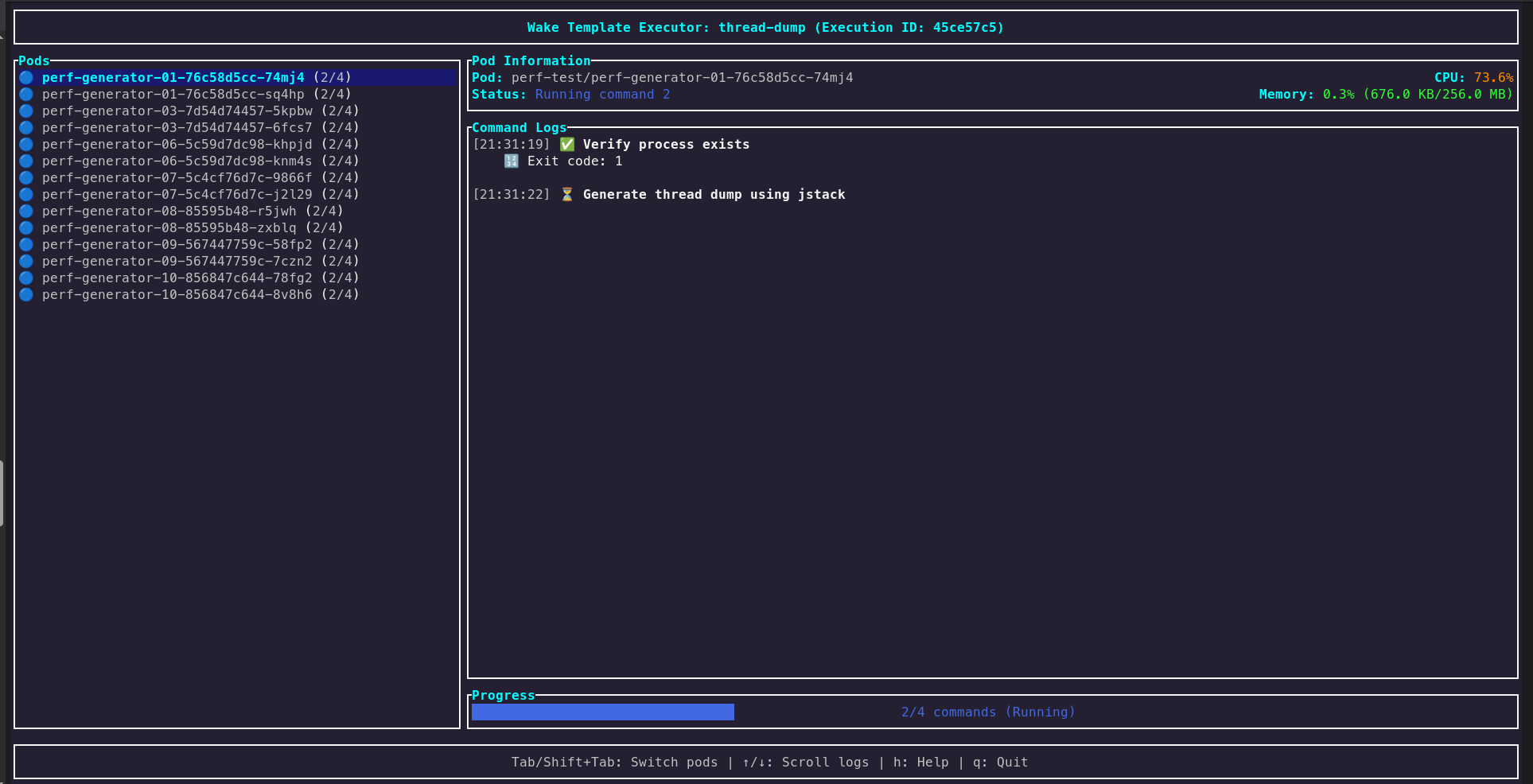
Wake includes a powerful template system for executing predefined diagnostic and maintenance tasks across multiple Kubernetes pods. Templates automate common operations like generating heap dumps, thread dumps, JFR recordings, and other diagnostic procedures with real-time monitoring and progress tracking.
Quick Start
# List all available templates
wake --list-templates

# Execute JFR template on matching pods
wake --exec-template jfr --template-args 1234 30s

# Execute heap dump template on specific pods
wake --exec-template heap-dump --template-args 1234

# Execute thread dump template
wake --exec-template thread-dump --template-args 1234

# Run template on specific namespace and pod pattern
wake -n production --exec-template jfr --template-args 1234 60s api-*
Built-in Templates
Java Flight Recorder (JFR)
Generate comprehensive performance profiles for Java applications:
# 30-second JFR recording for PID 1234
wake --exec-template jfr --template-args 1234 30s

# 2-minute JFR recording
wake --exec-template jfr --template-args 1234 2m
Heap Dump
Capture Java heap memory snapshots for memory analysis:
# Generate heap dump for process with PID 1234
wake --exec-template heap-dump --template-args 1234
Thread Dump
Generate Java thread snapshots for deadlock and performance analysis:
# Generate thread dump for process with PID 1234
wake --exec-template thread-dump --template-args 1234
Interactive Template UI
The template system features a sophisticated real-time interactive UI that provides:
Execution Monitoring
- Pod Execution Status: Visual progress indicators for each pod
- Live Resource Monitoring: CPU and memory usage updated every 2 seconds
- Command Output Logs: Detailed execution information and error handling
- Real-time Progress: Track template execution across multiple pods
File Management
- Automatic File Download: Generated files are downloaded to your local machine
- File Size Tracking: Monitor download progress with file sizes
- Smart Organization: Files organized by namespace and pod name
- Cleanup Management: Temporary files are cleaned up after successful download
Error Handling
- Detailed Diagnostics: Clear failure messages with actionable information
- Partial Success: Continue execution on other pods even if some fail
- Retry Logic: Built-in retry mechanisms for transient failures
Advanced Features
Parallel Execution
Templates run on multiple pods simultaneously:
- Concurrent Processing: Execute on all matching pods at once
- Resource Efficient: Intelligent scheduling to avoid overwhelming clusters
- Scalable: Handles hundreds of pods efficiently
Real-time Monitoring Integration
- Live CPU/Memory Tracking: Monitor resource impact during template execution
- Performance Correlation: See how template execution affects pod performance
- Resource Usage Alerts: Identify pods under stress during execution
Structured Output
Generated files are organized systematically:
template_output_YYYYMMDD_HHMMSS/
├── namespace1/
│   ├── pod1_heap_dump.hprof
│   ├── pod2_heap_dump.hprof
│   └── ...
└── namespace2/
    ├── pod3_jfr_recording.jfr
    └── ...
Use Cases
Performance Troubleshooting
# Capture JFR recordings during performance issues
wake -n production --exec-template jfr --template-args $PID 60s

# Generate heap dumps when memory usage is high
wake -n production --exec-template heap-dump --template-args $PID
Regular Health Checks
# Weekly performance profiling
wake -n production api-* --exec-template jfr --template-args $PID 5m

# Daily thread analysis
wake -n production worker-* --exec-template thread-dump --template-args $PID
Development and Testing
# Profile performance during load testing
wake -n staging --exec-template jfr --template-args $PID 2m

# Memory analysis during feature testing
wake -n dev feature-* --exec-template heap-dump --template-args $PID
Best Practices
- Start Small: Test templates on a few pods before running on large deployments
- Monitor Resources: Watch CPU/memory impact during template execution
- Time Appropriately: Schedule intensive operations during low-traffic periods
- Organize Output: Use consistent naming and directory structures
- Clean Up: Regularly clean old diagnostic files to save disk space
The template system is designed to be both powerful and safe, providing detailed visibility into execution progress while protecting your cluster resources.